 Companion for Creatio
It works on dev but not on test: comparing Creatio environments
When Creatio behaves differently on two environments, the cause is almost always one of four things: a package version, a system setting, a feature toggle, or lookup data. Compare them side by side rather than guessing. clio's save-state and show-diff compare environment state, and clio set-feature Code 1 -e test switches a feature toggle.
"It works on dev" is the most expensive sentence in Creatio projects. Both environments run the same product, so the difference is somewhere in their configuration or data, and clicking through two browser tabs to find it can take an afternoon. The fix is to compare the right things systematically.
The four usual suspects
- Packages: a package is missing on test, has a different version, or a schema inside it differs.
- System settings: a value such as an integration URL, a default or a limit was set on dev and never on test.
- Feature toggles: Creatio turns behaviour on and off with features, and a feature switched on for your user on dev may be off on test.
- Lookup data: a value a process or rule depends on exists on dev only, or has a different Id.
Feature toggles in Creatio
A feature has a code, a default state, and overrides for particular users or roles. That is why one person sees a behaviour and another doesn't on the same environment. To switch one with clio:
clio set-feature UsrNewOrderFlow 1 -e test
clio set-feature UsrNewOrderFlow 0 -e test
1 turns it on, 0 off, and the feature is created if it doesn't exist. Check clio set-feature --help for the options that control which users or roles it applies to. Exit code 0 means the state reached the environment.
Comparing with clio
- Packages:
clio list-packages -e devand-e test, then compare names and versions. - Environment state:
clio save-statesaves an environment's state to a manifest file, andclio show-diffcompares environments or manifests. Run each with--helpfor the options in your clio version. - Settings and data: read them with
clio execute-sql-scripton both sides and diff the CSV output.
Comparing in one screen
Companion for Creatio has two screens for this:
- Compare captures a snapshot of each environment and shows the differences by category: Packages (expandable down to individual schemas), Settings, Features and Web services, each row marked Differs, Only in source or Only in target. A Lookups tab shows which lookup values differ, row by row. It runs against saved snapshots, so it is read-only; setting values that may hold secrets stay hidden until you reveal them, and exported reports leave them out.
- Features lists every feature toggle with its default and how many groups override it, with a switch to turn one on or off. Set Compare with to a second environment and it becomes a difference list, including features that exist on only one side.
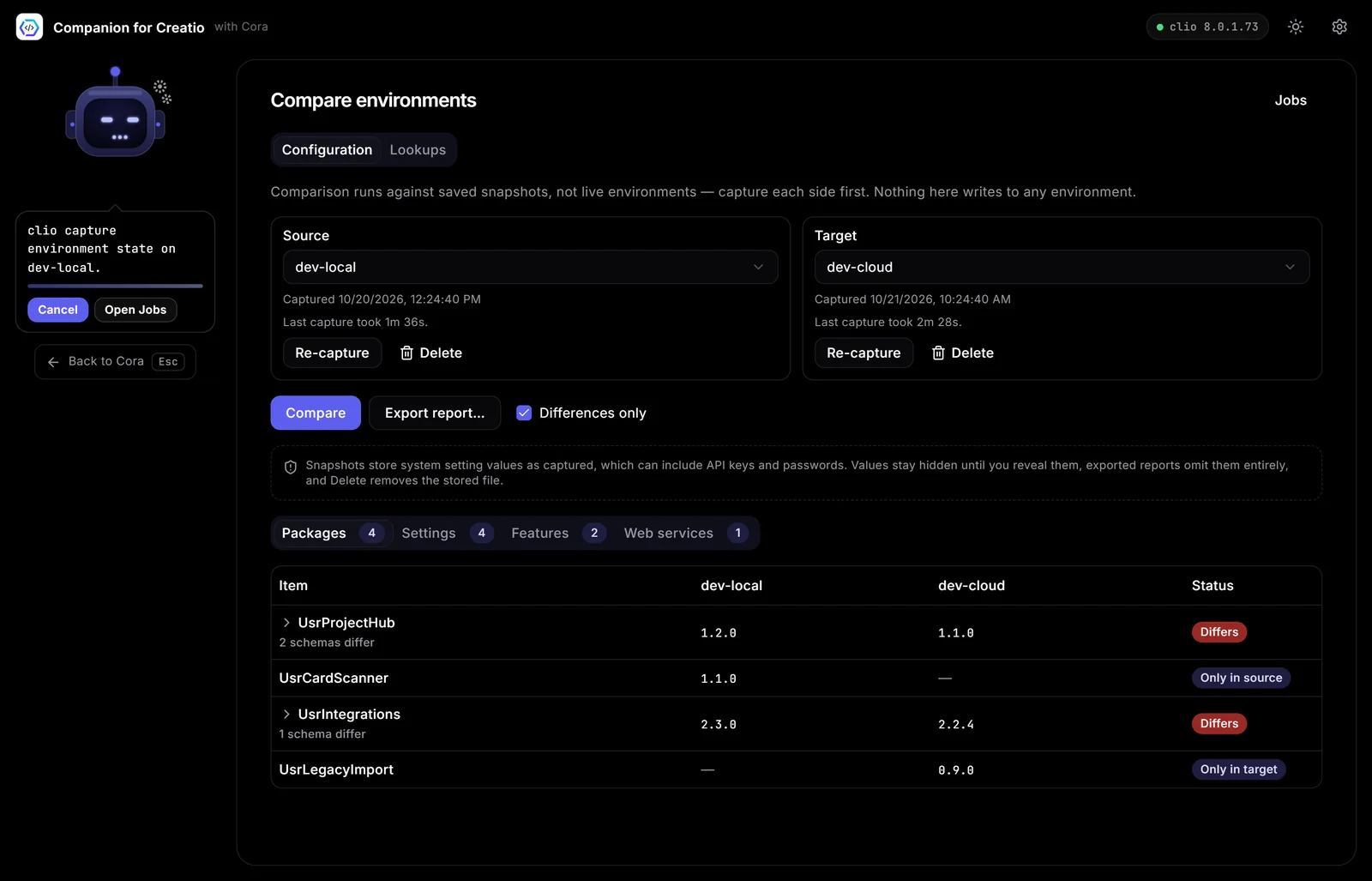
Once you have found the difference, fix it at the source: deploy the missing package, migrate the lookup data, or set the feature, and then compare again to confirm the environments match.
Companion for Creatio is a free desktop app for Windows and macOS that runs these clio steps for you, as jobs you can watch and cancel.